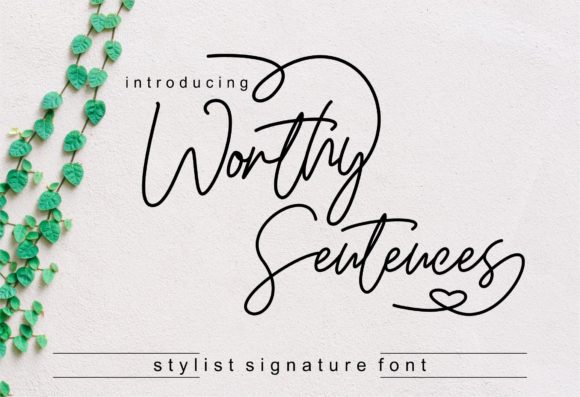
Worthy Sentences: A Magical Handwritten Font for Web Design
As a web designer, I’m always on the hunt for fonts that can add a touch of elegance and personality to my projects. Recently, I stumbled upon Worthy Sentences, a premium handwritten font that has quickly become a favorite in my design toolkit. This typeface is not just visually appealing; it's also incredibly versatile and can elevate any digital experience.
Visual Personality and Style
Worthy Sentences is a beautifully crafted script font with an authentic, hand-drawn feel. Its elegant curves and subtle variations give it a charming, almost magical quality. The font’s personality is both graceful and approachable, making it perfect for creating a warm and inviting atmosphere on any website.
When I first tested Worthy Sentences in a hero section, I was immediately struck by its ability to command attention without overwhelming the viewer. The font’s natural flow and rhythm make it ideal for headlines and key messaging, adding a touch of sophistication to the overall design.
Using Worthy Sentences in Web Layouts
One of the most important aspects of web design is creating a strong visual hierarchy. Worthy Sentences excels in this area, especially when used for hero titles and section headings. I recently used it on a creative portfolio site, where it perfectly complemented the clean, modern aesthetic of the rest of the layout.
In another project, I incorporated Worthy Sentences into a boutique online store. The font added a personal, artisanal touch to the product banners and call-to-action areas, enhancing the brand’s identity and making the shopping experience more engaging.
Readability and Responsive Design
While Worthy Sentences is a decorative font, it still maintains good readability, especially in larger sizes. For mobile screens and responsive layouts, I found that using Worthy Sentences for short phrases and titles worked best. It’s essential to balance the font’s decorative elements with clear, legible text, so I often pair it with a simple sans serif font for body copy.
For example, on a coaching website, I used Worthy Sentences for the main headline and a clean, modern sans serif for the supporting text. This combination ensured that the content was both visually appealing and easy to read, even on smaller devices.
Font Pairing and Brand Identity
Choosing the right font pairing is crucial for maintaining a cohesive and professional look. Worthy Sentences works exceptionally well with a variety of other fonts. For a more editorial and sophisticated feel, I recommend pairing it with a classic serif font. For a modern and minimalist approach, a simple sans serif font is a great choice.
In a recent course sales page, I used Worthy Sentences for the main title and a bold sans serif for the subheadings. This combination created a strong visual impact while keeping the design clean and focused. The result was a page that felt both professional and welcoming, effectively engaging the audience and encouraging them to explore further.
Licensing and Practical Considerations
Before using Worthy Sentences in any commercial project, it’s important to check the licensing terms. The font comes with multiple styles, alternates, and weights, which can be incredibly useful for creating a consistent and dynamic brand identity. Additionally, it includes webfont formats, making it easy to integrate into your website.
It’s also worth noting that while Worthy Sentences is a fantastic choice for headers, titles, and decorative accents, it may not be the best option for long body text or small navigation elements. For these, a more readable and less decorative font is recommended to ensure a smooth user experience.
In conclusion, Worthy Sentences is a versatile and elegant font that can significantly enhance the visual appeal and emotional impact of your web designs. Whether you’re working on a creative portfolio, an online store, or a landing page, this font is a valuable addition to your design toolkit. Just remember to use it thoughtfully and pair it with complementary fonts to create a balanced and engaging user experience.